

Ilmah Logo Studio Ilmah
BILLR

Focused Invoicing SaaS for Freelancers

A freelancer invoicing SaaS designed to simplify invoice creation, payment tracking, client management, and financial visibility through a calm, productivity-focused interface.

View Prototype
YEAR 2026
DURATION 5 Weeks
ROLE Lead Product Designer & Developer
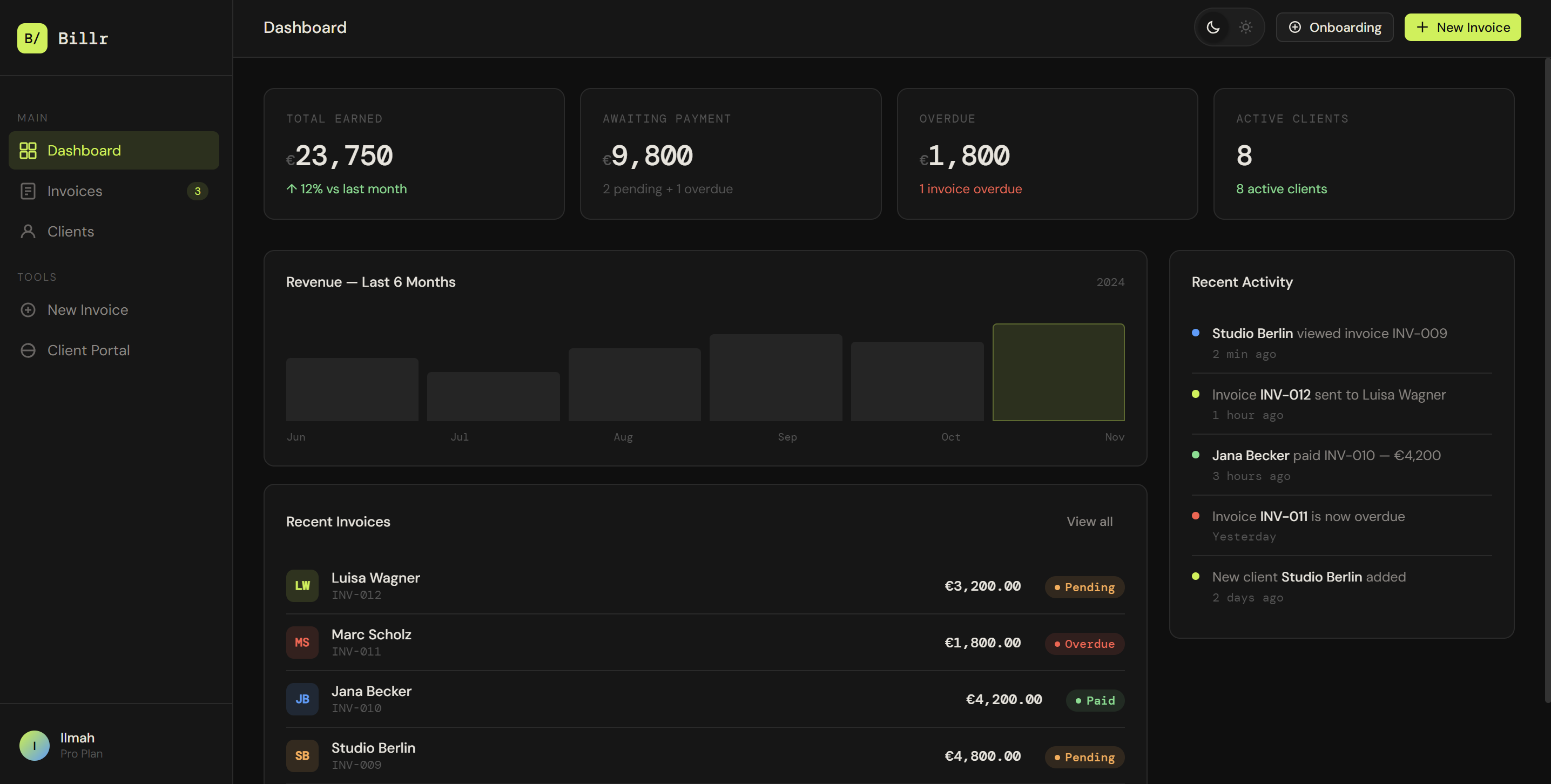
Billr Dashboard Mockup Preview
THE CHALLENGE

Helping Freelancers Manage Invoices Without Feeling Lost in Admin Work

Freelancers often manage invoices, clients, payments, and follow-ups across disconnected tools, spreadsheets, email threads, and banking apps. This creates unnecessary friction, especially when they need to understand what has been paid, what is still pending, and which clients require attention. The challenge was to design a SaaS experience that makes invoicing feel clear, fast, and controlled, while still giving freelancers enough flexibility to manage real client work.

THE SOLUTION

A Calm, Data-Driven Invoicing Workspace for Independent Professionals

I designed Billr as a focused SaaS platform that brings together invoice creation, payment tracking, client management, onboarding, and client-facing payment previews. The interface uses a clean dashboard structure, clear status indicators, simple forms, and a dark productivity-focused visual system to help freelancers understand their finances at a glance and take action quickly.

Final UI Showcase

01 / 06
DASHBOARD

Financial Clarity at a Glance

The dashboard gives freelancers a quick overview of total earned, awaiting payment, overdue invoices, active clients, recent invoices, revenue activity, and recent actions. It helps users understand the state of their business without opening multiple pages.

billr.app/dashboard
šŸ“Š
billr-feature-carousel-01.png

Visual interface mockup showing: Dashboard

01 / 06 - DASHBOARD
BACKGROUND

Designing a SaaS Tool Around Freelance Workflows

Billr was created as a concept SaaS project exploring how independent professionals could manage invoicing with more confidence and less complexity. Instead of designing a heavy financial platform, I focused on the daily needs of freelancers: creating invoices quickly, seeing what is unpaid, managing clients, and sharing a clear payment view with clients.

The goal was to create an interface that feels practical, calm, and trustworthy. Since financial tools can easily become overwhelming, the design uses clear hierarchy, compact cards, restrained typography, and strong status indicators to keep the experience focused.

"Financial tools for freelancers shouldn't feel like enterprise accounting software. They should feel like a calm extension of their work."

Focusing on daily friction points guided every decision in the Billr system.

RESEARCH

Understanding Common Freelancer Invoicing Pain Points

This project was informed by common freelancer pain points and patterns found in existing invoicing tools. UX competitive analysis was conducted to examine where standard platforms fall short for smaller service providers.

Core Pain Points Identified

Competitors Benchmarked

FreshBooks

FreshBooks

ACCOUNTING DENSE
  • Strong invoicing features and time tracking
  • Can feel overly complex for solo freelancers
Bonsai

Bonsai

ALL-IN-ONE PREMIUM
  • Integrated contracts and invoicing flow
  • Pricing structure is high for beginners
QuickBooks

QuickBooks

ENTERPRISE TAX TOOLS
  • Robust bookkeeping and business metrics
  • Intimidating financial terminology and setup
Zoho Invoice

Zoho Invoice

FREE TIER SIMPLE
  • Frictionless invoice creation forms
  • Aesthetic feels outdated and lacks narrative portals

Competitive Matrix Analysis

STRENGTHS IDENTIFIED

  • Strong dashboard structures displaying cashflows.
  • Clear invoice status systems utilizing status badges.
  • Detailed client directories and payment profiles.
  • Professional, standardized invoice layout templates.

WEAKNESSES IDENTIFIED

  • Some tools feel bloated and complex for small freelance operations.
  • Accounting terminology is often confusing or intimidating.
  • Primary invoice workflows are hidden under deep nested menus.
  • Lack of client-portal views causes uncertainty before sending.

OPPORTUNITIES FOR BILLR

  • Build a lighter, streamlined workspace designed specifically for freelancers.
  • Highlight payment status indicators directly in the dashboard.
  • Integrate dynamic form-filling alongside a live invoice template preview.
  • Provide a dedicated preview showing the exact client portal experience.
  • Leverage a dark, calm interface instead of a clinical corporate finance style.

THREATS TO MITIGATE

  • Incumbents holding extensive payment integrations.
  • Highly complex local accounting regulation constraints.
  • Solo freelancers returning to basic spreadsheets due to app adoption fatigue.
šŸ“‘
competitor-analysis-billr.png

Competitor feature matrix comparison board and analysis notes.

RESEARCH ASSET
DEFINE

Defining the Core User

To keep the freelancer workflow central, I defined a user persona that guides all invoicing design paths.

User Persona

Maya Hoffmann - Freelance UX/UI Designer
Maya Hoffmann
Freelance UX/UI Designer
AGE32
OCCUPATIONDesigner
LOCATIONBerlin

Maya Hoffmann needs a simple way to create invoices, track payment status, manage clients, and send professional payment links without spending too much time on admin work.

GOALS & NEEDS

  • Create professional invoices in seconds.
  • Track pending, paid, and overdue invoices in a single dashboard view.
  • Save client records to avoid manual data entry on future transactions.
  • Easily share payment portal links directly through emails or chat threads.

FRUSTRATIONS

  • Losing track of pending and overdue invoices.
  • Rewriting client details repeatedly.
  • Switching between spreadsheets, email, and banking tools.
  • Feeling unsure if an invoice looks professional enough for clients.
šŸ‘¤
persona-billr.png

Detailed User Persona Profile layout and workflow diagram for Maya Hoffmann.

PERSONA MOCKUP
HOW MIGHT WE...

How might we make invoicing feel clear, fast, and controlled, while still giving freelancers enough flexibility to manage real client work?

FEATURE ROADMAP

Prioritizing the Core SaaS Experience

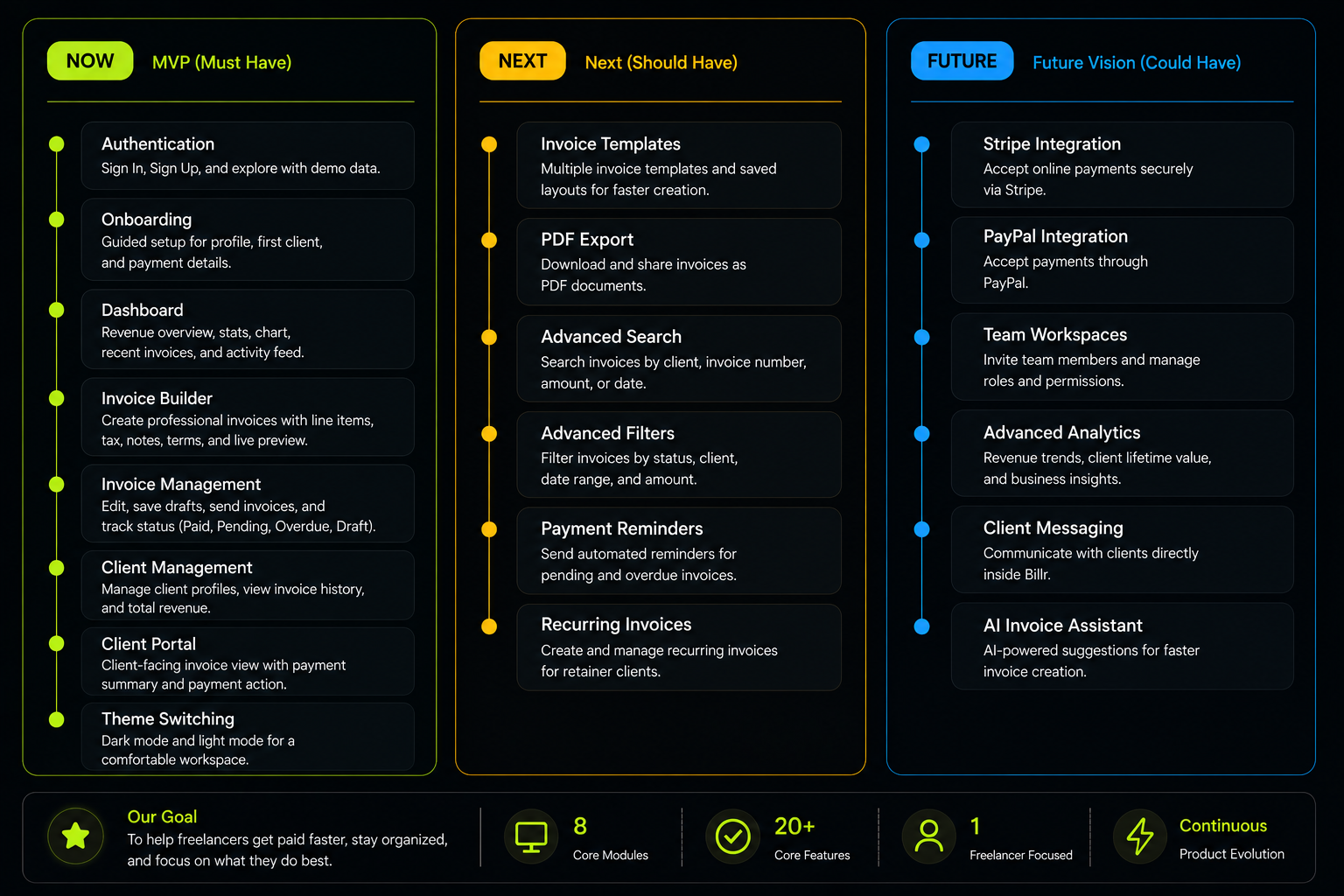
To define the product scope, I focused on the essential features a freelancer needs to manage invoices from setup to payment.

The initial MVP release scope contains the following features:

• Authentication / Demo access
• Onboarding flow
• Dashboard overview
• Status & Revenue cards
• Invoice list table
• Search & Status filters
• Invoice builder form
• Dynamic line items
• Currency selection
• Live invoice preview
• Draft saving & Sending
• Client portal preview
• Shareable payment link
• Payment confirmation
• Client management records
• Profile settings
• Light / Dark mode toggle
• Local saved data (Localstorage)

By focusing strictly on invoicing lifecycle features rather than general accounting, Billr provides a fast, dedicated tool that is immediately understandable and requires no configuration.

Billr Feature Roadmap
PRODUCT STRUCTURE

Translating the SaaS Flow into a Product Structure

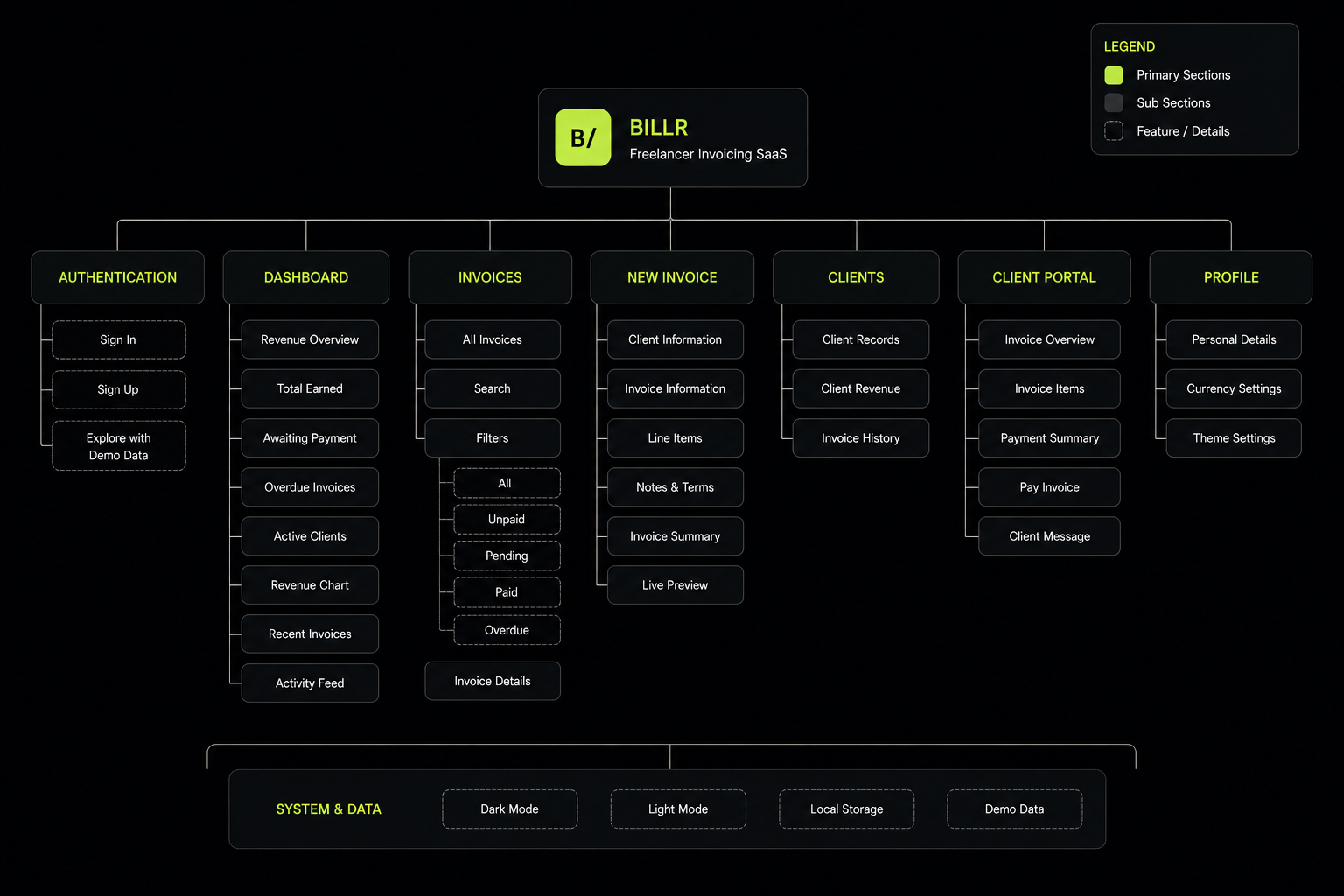
The product structure was organized around the main freelancer workflow: entering the workspace, reviewing financial status, managing invoices, creating a new invoice, checking clients, and previewing the client-facing payment experience.

Auth & Onboard
Sign In / Sign Up
Demo Access Mode
Guided Onboarding
Setup Payment Info
Freelancer Workspace
Dashboard Summary
Invoice Registry
Invoice Creator & Preview
Client Records Manager
Client Portal
Invoice Summary View
Line Items Details
Stripe Payment Button
Invoice Message Box
Billr Site Map
DESIGN PROCESS

Designing a Focused SaaS Interface

The visual design uses a dark productivity-focused interface with a bright lime accent to highlight primary actions, active navigation, financial totals, and important states. The typography combines DM Sans for readable interface text and DM Mono for invoice numbers, data labels, amounts, and structured financial information.

The system follows these design principles:

  • • Reduce visual noise – Minimal lines, flat cards, and clear grids replace heavy bevels or distracting gradients.
  • • Make payment status immediately visible – Status badges use high-contrast accents to call out overdue payments.
  • • Keep forms structured and predictable – Input fields align with the resulting invoice layout logic.
  • • Separate freelancer view from client view – A private backend for the creator, and a clean public page for the client.
  • • Use live preview to build trust – Live PDF updates sync as user enters items.
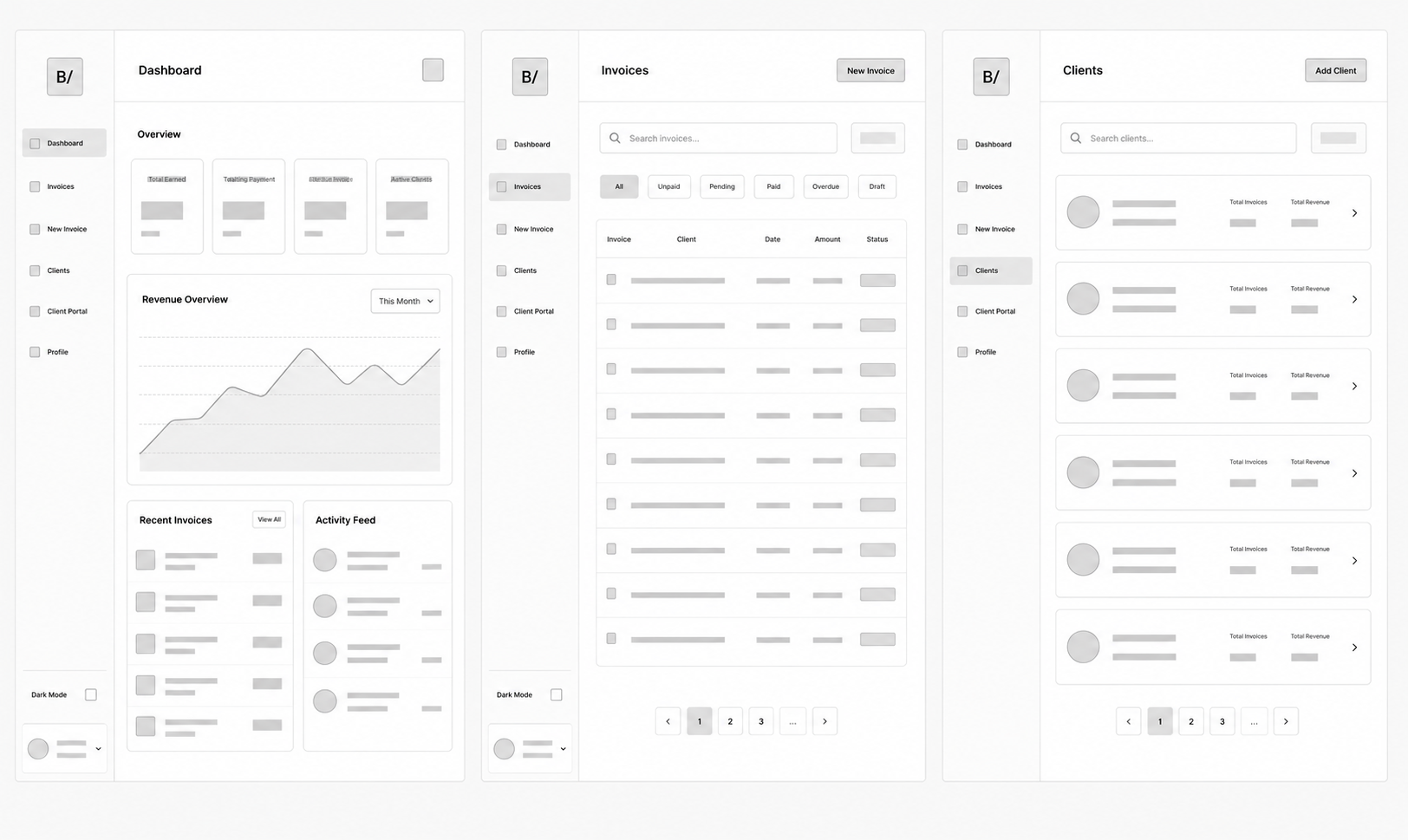
Billr Wireframes
šŸŽØ
visuals-billr.png

High-fidelity UI compositions showcasing key dashboard, builder, and portal pages.

HI-FI COMPS

TYPOGRAPHY SPEC

DM Sans

Used for readable interface typography, buttons, inputs, and paragraphs.

DM Mono

Used for invoice codes, financial amounts, timestamps, and sitemap trees.

COHESIVE PALETTE

#0F0F0F
#161616
#C8F135
#B8F24C

Key UX Decisions

01 UX DECISION GO

Status-First Invoice Management

Instead of making users open every invoice, Billr uses visible badges for paid, pending, overdue, and draft states so freelancers can understand priorities immediately.

02 UX DECISION GO

Live Invoice Preview

The invoice builder shows a preview beside the form, helping users feel confident that the invoice looks professional before saving or sending.

03 UX DECISION GO

Client-Facing Portal Preview

The client portal preview helps freelancers understand the client experience, including the invoice summary, payment breakdown, payment button, and message area.

TESTING & ITERATIONS

Making the Workflow Clearer and Faster

For this concept project, the interface was reviewed through task-based checks focused on common freelancer actions to test usability and layout clarity.

USABILITY TESTING CHECKS

  • • Sign in or explore with demo data
  • • Understand dashboard financial status
  • • Filter invoices by status
  • • Create a new invoice
  • • Add or remove line items
  • • Save a draft or send an invoice
  • • Preview the client payment page
  • • Update profile details
  • • Switch between dark and light mode

Testing Findings: The dashboard made financial status easy to understand. The invoice builder became clearer when grouped into sections. The live preview helped reduce uncertainty. Status filters improved invoice discovery.

Mobile layouts still need refinement, so mobile screenshots are not displayed in this case study yet.

1. Invoice Creation Confidence
✨
billr-before-after-invoice-builder-after.png

AFTER: A structured invoice builder with line items, summary, currency selection, notes, terms, and live preview.

ITERATION 1 (AFTER)
āŒ
billr-before-after-invoice-builder-before.png

BEFORE: A basic invoice form without enough preview support.

ITERATION 1 (BEFORE)
AFTER REDESIGN
2. Improving Payment Visibility
✨
billr-before-after-payment-visibility-after.png

AFTER: Dashboard cards, status badges, invoice filters, overdue states, and payment confirmation make invoice status clearer.

ITERATION 2 (AFTER)
āŒ
billr-before-after-payment-visibility-before.png

BEFORE: Invoice status was harder to understand without strong hierarchy.

ITERATION 2 (BEFORE)
AFTER REDESIGN
OUTCOMES & IMPACT

Measurable Improvements

The final Billr design brings together dashboard analytics, invoice management, client records, onboarding, and a client-facing payment preview into one cohesive SaaS experience.

The product supports the core freelancer workflow from setup to invoice creation, tracking, and payment review. Solo designers and service providers can now build and monitor invoicing operations cleanly in one dark, optimized dashboard that saves both client details and item records.

6
Core SaaS Screens

Complete templates including onboarding, builder, portal, and dashboard.

25+
UI Components

Reusable interface controls for cards, status badges, forms, and tables.

4
Primary User Flows

Optimized creation, customer payment, onboarding, and client directories.

2
Major UX Iterations

Product usability issues directly resolved through design updates.


Interactive Walkthrough

Watch the video overview demonstrating invoice builder features and dashboard analytics:

Billr Video Walkthrough Poster

Final Design Video Walkthrough

Click to play the product walk-through showing live client invoicing flow.

FINAL THOUGHTS

What I Learned

Billr helped me think more deeply about SaaS product structure, not only visual interface design. Designing this product required balancing data clarity, form usability, dashboard hierarchy, and client-facing trust. I learned how important it is for SaaS interfaces to support both quick scanning and detailed task completion.

Next Steps

With more time, I would refine the mobile experience, add deeper invoice template customization, integrate real payment methods, improve analytics, and test the workflow with more freelancers.

What I'm Most Proud Of

I’m most proud of creating a product that feels complete as a SaaS concept. Billr includes onboarding, dashboard insights, invoice creation, client management, client portal preview, saved data, and theme switching, which makes the project feel more like a real product than a static interface.